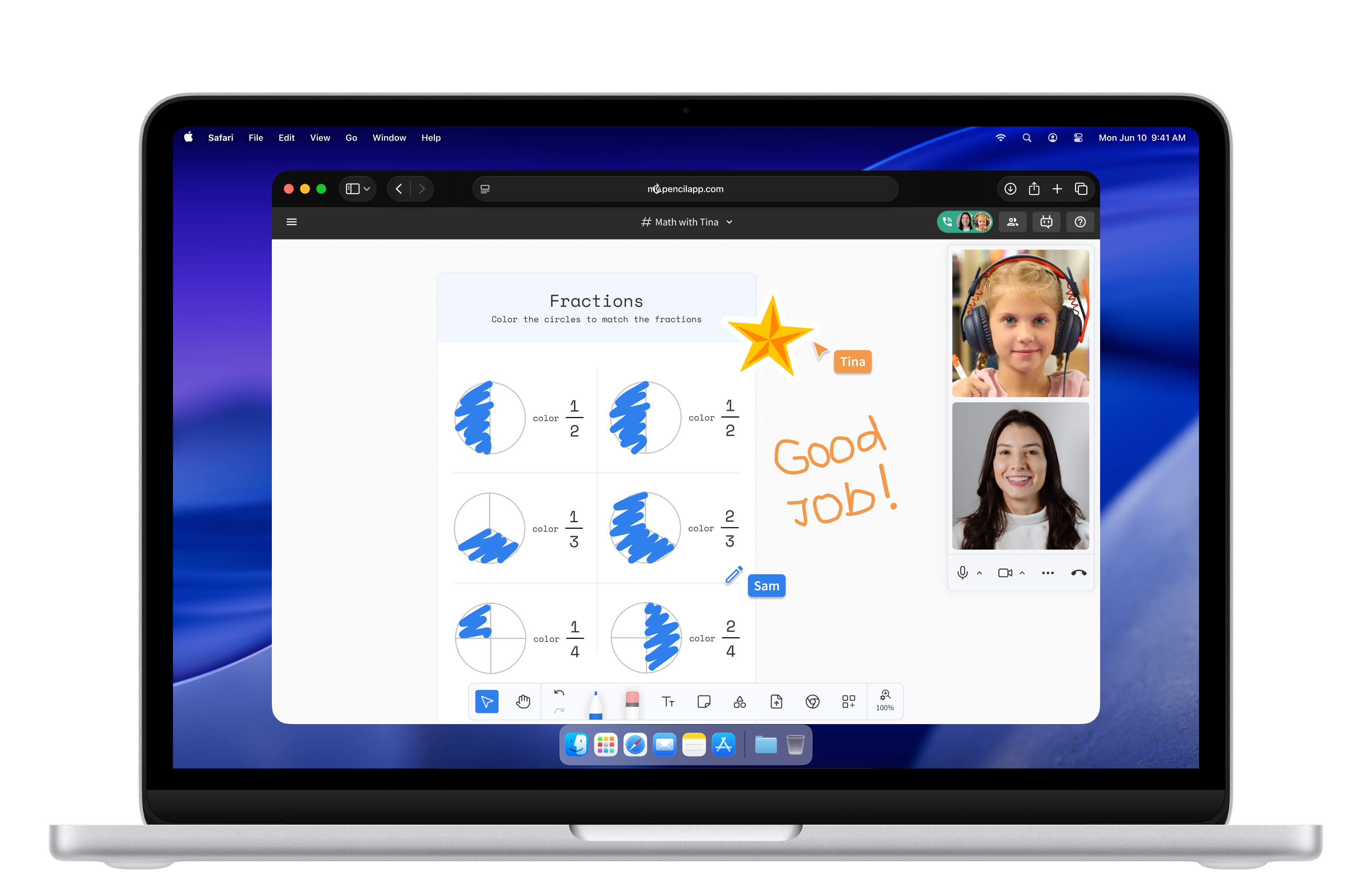
Live tutoring and instruction sessions on Pencil Spaces.
24-month evidence. 100% over the last 90 days. Public trust portal.
From Apple School Manager push to live classrooms on a fleet of MacBook Neos.
Opens in Safari on every Mac. No App Store gate. No IT ticket.
/ 01 — Professional learning, training & support
New training categories.
Pencil Spaces + MacBook Neo opens up training categories that didn't exist before: how to teach with iPhone Desk View as the document camera, how to use Apple GPU engagement overlays, how to deploy Pencil Spaces across a district, how to certify a teacher as a Pencil Spaces Educator. Resell our catalog at revenue share, deliver your own under our train-the-trainer kit at full margin, or layer both.
For educators — Pencil Spaces training
6 named coursesThe starter credential. 8-hour cohort covering the daily-use workflow on MacBook Neo — lesson planning, recording, parent reports, basic engagement signals. Every educator on the deployment earns this cert.
MacBook Neo as a teaching device. macOS multitasking, Spotlight, Quick Look, Mission Control, Stage Manager — in the context of running concurrent lessons across many cohorts.
Setting up Continuity Camera with iPhone as the perspective document camera. Mounting, lighting, ingest, projection. Pure novelty — no incumbent training market for this skill.
For deployments with iPad in the room. Sub-100 ms ink, PencilKit features, Apple Pencil Pro gestures (squeeze, hover, double-tap, barrel roll), Universal Control with MacBook Neo.
Apple GPU face detection, real-time engagement signals (focus, drift, hand-raised), AR character overlays for K-5 learners. Designed for educators using the advanced engagement features in daily instruction.
Math, literacy, science, ESL / multilingual, special education. Subject-aligned lesson templates, assessment patterns, and pedagogical guidance. Quarterly cohorts.
For administrators — district & IT
5 named coursesFor district IT and EdTech leads. ASM + Jamf + Managed Apple IDs configuration. SSO, roles & permissions, audit logging, MDM policies. Closes the loop from procurement to live classrooms.
For academic leaders. Reading engagement data across schools, setting district KPIs, spotting teachers who need support, identifying classrooms doing it well.
For legal, compliance, and procurement staff. FERPA, COPPA, GDPR, HIPAA, ISO 27001 — the questions a district CIO has to answer and how Pencil Spaces answers them.
Certify internal district PD staff to deliver Pencil Spaces training locally. Curriculum kits, lesson templates, assessment rubrics, ongoing updates. Train-the-trainer at the district level.
Using lesson recordings, automated reports, and student work to drive family communication. Cuts parent-conference prep time materially.
For higher ed & specialty programs
4 named coursesFor university faculty. Office hours, recorded lectures, asynchronous course components, gradebook integration. The MacBook Neo + Pencil Spaces workflow for higher ed.
Canvas, Blackboard, Moodle, D2L. LTI 1.3 setup and gradebook flow. Practical session for instructional designers and edtech administrators.
VoiceOver, Live Captions, dynamic transcripts, reduced-motion modes. Universal Design for Learning native through macOS and iOS.
For tutoring providers, learning centers, and supplemental programs. High-volume session management, scheduling integrations, family reporting, billing flows.
Three paths to channel revenue
Sell, deliver, or bothResell at revenue share.
We deliver the training, you carry margin. Revenue share negotiated per contract, recurring on cohort renewals. Branded as your service, listed on your invoice, supported by our cohort operations.
Train-the-trainer. Full margin.
Your PD team certifies through our 2-week program. Co-branded materials, lesson templates, assessment rubrics, ongoing curriculum updates. You deliver, full margin to you, your brand on every certificate.
Bundle into the hardware deal.
Training line items land in the same procurement packet as the MacBook Neo order — cleanly priced, scoped, and discounted as a bundle. The hardware deal becomes a training contract on the same paper.
Support — included with every deployment
SLAs, success, escalationPriority support queue.
Channel-deployed customers get a priority queue with a target response under 4 hours, escalations to solutions engineering, and a documented incident response path.
Customer Success Manager.
Enterprise, district, and ministry deployments get a named CSM — tracking adoption, surfacing engagement signals, feeding your account growth motion, and renewing the training contract.
SLAs by tier.
99.99% uptime SLA across the last 24 months. 100% uptime over the last 90 days. Posted publicly on the trust portal. Tiered SLAs available for ministry-grade contracts.
/ 02 — Outcomes
Real classrooms. Real change.
Pencil Spaces serves a customer base spanning K-12 districts, university programs, and ministry-level deployments across the U.S. and abroad. Programmes already shipped. Customers a peer can call.
Multi-site literacy programme
Charlotte‑Mecklenburg, NC
“Pencil Spaces has been instrumental in our transformation — enabling us to serve more students and bring literacy to the children of Charlotte‑Mecklenburg.”
Corps-member instructional support
National
A consistent classroom platform across geographies, with the recording and observation surface coaches need to actually coach.
Higher-ed instructional pilots
R1 research universities
Research-grade environments for studying how live, recorded, and reviewed instruction changes outcomes.
Daily use across institutional customers — durable, audited, referenceable.
Plus SOC 2 Type II, FERPA, COPPA, GDPR, ISO 27001.
Approved through NYC DOE, Switzerland, Singapore, and Korea procurement audits.
/ 03 — Built for education
Built for education.
Not retrofitted from video conferencing.
Every other tool an educator opens started life somewhere else. Zoom for office meetings. Google Meet for Google. Teams for Microsoft. Whiteboards for whiteboards. Pencil Spaces was built for education from the outset — for K-12 classrooms, university seminars, and ministry-level deployments alike. The difference shows up in four places, each visible in a thirty-second demo.
The camera
Conferencing tools assume the camera is the focus. In education, the work is the focus. Pencil Spaces puts the camera in service of the work — at eye level on the Mac, with the lesson surface running in the same window. The educator is looking at students, not down at a tab.
The canvas
Most online whiteboards never met a webcam. Pencil Spaces was designed with both in the room. The canvas is the lesson surface, not a screen-share of one. Every app the educator already uses lives inside it. Students appear next to the work, not in a separate window.
The recording
Conferencing tools record meetings. Pencil Spaces records lessons. Annotations replay in time with the audio. Live Captions transcribe automatically, on device. A student who missed Tuesday can watch the lesson — not a meeting that happened to be a lesson.
The price
Conferencing tools charge per seat — which means every additional student is an additional cost. Pencil Spaces is licensed per educator. A K-12 teacher with thirty students, a professor with three sections, a learning center with forty weekly groups — each is one license. The math holds at any scale.
/ 04 — By segment
Talking points to
walk in with.
Three segments where the bundle holds. Each line below quotes directly into a procurement conversation.
The superintendent who needs fewer apps that do more.
SUPERINTENDENT · CIO · CTO
- Per-educator pricing — no per-student or per-seat fees
- Apple School Manager + Jamf push to first lesson same-day
- SOC 2 Type II, FERPA, COPPA — audited annually
- Parent-facing reports auto-generated from lesson recordings
- Reference customers — Augustine Literacy Project, Teach For America
The provost running three modalities at once.
PROVOST · CIO · DEAN OF ACADEMIC AFFAIRS
- SSO with campus identity (SAML, Sign in with Apple, Managed Apple IDs)
- Recorded lectures with searchable, on-device transcripts
- Office hours with a real whiteboard, not a screen-share
- LTI integration with Canvas, Blackboard, Moodle, D2L
- Reference customers — Carnegie Mellon, NYIT
The minister who needs to scale a country.
NATIONAL & REGIONAL PROCUREMENT
- GDPR with local data residency on request
- Localization across the languages of instruction
- One contract, one procurement cycle, one platform
- Scales the way a country procures — one teacher, many rooms, many sites
- Dedicated solutions team — engineering, security, education
- Built to deploy alongside Magma Math and other ministry-level partners
/ 05 — The three lines to walk in with
Better instruction.
Faster setup.
Easier to scale.
Three lines for a procurement room. Three reasons the Mac fleet becomes a teaching fleet.
-
Live ink that arrives before the student looks down.
PencilKit-native handwriting renders for the learner in under 100 ms. The educator's hand and the educator's voice arrive at the same time, the way they would in a physical room.
-
Engagement signals that show who's with you.
On-device facial and audio engagement read by the A18 Pro Neural Engine. The educator sees the room without watching it. The data stays on the device.
-
Recording the educator actually replays.
Every lesson recorded, indexed, transcribed, and searchable. Coaching loops, IEP review, family updates — built-in, not bolted-on.
-
Zero downloads. One URL.
Pencil Spaces opens in Safari on any new MacBook Neo, anywhere in the building, the second the device is unboxed. No App Store dependency. No version drift.
-
Time-to-first-lesson, not time-to-first-ticket.
A teacher can run their first lesson before lunch on the day the device arrives.
-
Apple School Manager · Jamf · Managed Apple IDs.
Deploy the platform the way IT already deploys everything else on Mac. The one-MDM-profile motion the channel has been running for years.
-
One teacher. Many rooms. Many sites.
The platform that scales the way a country procures it. Sub-fleet, district, ministry — same product, same SLA, same number to call.
-
The wraparound margin built right in.
Professional learning, deployment, content packaging, level-1 support — all run on top of the platform. The channel's services stack stays intact; the catalog above is the menu.
-
The same demo that lands in any segment.
K-12 homeroom, university lecture hall, ministry hallway, 1:1 program. The browser-based Pencil Space is the same product in every room, on every Neo.
/ 06 — Pairs with what you sell
The apps you already sell. Already inside.
Canva, Kahoot!, GoodNotes, Seesaw, Magma Math, Logitech, Kaligo — plus the channel infrastructure (Jamf, Apple School Manager, professional learning). Same apps. Same demo. Each one extended by the Pencil Space around it.
Becomes the canvas of the lesson — not a brand asset library. Drop a design straight onto the shared whiteboard, edit live, students see it land.
A live check-in inside the lesson. New layer of formative assessment that wasn't possible before. No tab-switching, no second device.
Walk through the student's notebook page by page, mid-lesson. Import GoodNotes pages into a Pencil Space. Export annotations back.
Push lesson artifacts into Seesaw portfolios for early-grades classrooms — recordings, annotations, worksheets, automatically.
PencilKit-native math practice with foundation models. Deployed at the ministry level alongside Pencil Spaces.
Document cameras and styluses, plug-and-play into the Pencil Space, recognized as first-class video sources. A bundle that travels through Logitech's channel as well as ours.
Early-literacy handwriting practice, embedded inside the educator's lesson plan.
Pencil Spaces deploys via Jamf School and Jamf Pro. MDM-ready out of the box.
Push to a thousand devices with one profile. Managed Apple IDs handle identity. Zero-touch.
Coursework delivered through a Pencil Space — at scale, without travel cost. See the catalog →
Camera up. Ink down.
The teaching posture.
Most schools already have iPad fleets. Pencil Spaces is already in production on those fleets. The MacBook Neo + Pencil Spaces ask isn't a second-device order — it's the missing half: an eye-level camera, a full educator command surface, an ASM-deployable laptop fleet. One device added. The whole workflow unlocked.
The Mac puts the camera at eye level.
MACBOOK NEO · CONTINUITY CAMERAAn iPad propped on the desk forces the educator to look down. MacBook Neo's webcam sits at eye level — the unlock the iPad fleet has been missing.
Sub-100 ms ink, on the iPads you own.
PENCILKIT · APPLE PENCIL PROPencil Spaces is built on PencilKit. Strokes render in under 100 ms with full Apple Pencil Pro support — squeeze, hover, double-tap, barrel roll. The premium of the iPad investment, paying out.
One Pencil Space. Two surfaces.
UNIVERSAL CONTROL · CONTINUITYThe Magic Keyboard and trackpad on MacBook Neo drive iPad. Drag a worksheet from Mac onto an iPad whiteboard mid-lesson. State syncs through Continuity.
One license per educator. Both devices included.
PER-EDUCATOR PRICINGThe iPads the school already owns are already licensed under per-educator Pencil Spaces pricing. Adding MacBook Neo doesn't add a second license — one seat covers both surfaces.
/ 08 — How Pencil Spaces uses the Apple stack
Features only Apple ships.
Pencil Spaces ships with them.
Pencil Spaces is engineered around Apple's developer kits and platform APIs — not adapted to them. Below: the Apple-specific capabilities Pencil Spaces uses on MacBook Neo, with the Apple anchor for each. Every item is a real feature in production today. Every item is a reason the educator's laptop is a Mac.
The lesson recap writes itself.
Before the bell.
The A18 Pro Neural Engine in MacBook Neo runs Pencil Spaces' handwriting recognition, focus detection, live captioning, and lesson summaries on device. When a student raises a hand, the educator feels it — a quiet haptic on the Mac trackpad, or on Apple Watch and iPhone via Live Activities. Less data leaves the room. No per-seat cloud-inference billing. On-device intelligence as the privacy posture — and the A18 Pro is what makes it possible.
iPhone as document camera. Two taps.
An iPhone clipped above the desk becomes the document camera — perspective-corrected by iOS, ingested by Pencil Spaces, projected onto the shared whiteboard. The setup is one iPhone and one MacBook Neo. No second purchase required.
Real-time face. 3D in the room.
GPU-accelerated face detection, real-time engagement signals (focus, drift, hand-raised), AR character overlays for K-5 learners. The educator can teach as Nemo, an F1 driver, or a NASA astronaut. Runs on Apple silicon, nowhere else.
The educator's command surface.
Full keyboard, precision trackpad, high-resolution display — tuned for running concurrent lessons, multi-pane layouts, drag-and-drop. Pencil Spaces UI matches the system accent color.
Many lessons. One Mac.
A K-12 teacher with five sections, a professor with three courses, a learning center with twelve concurrent groups. Each lesson is a Pencil Space, separated by Stage Manager, surfaced by Mission Control.
A website on every Mac. No install.
Pencil Spaces opens in Safari. No App Store gate, no separate download path, no IT ticket, no version drift. WebKit handles the real-time canvas and multi-stream video pipeline at 60 fps.
Shipment to first lesson, in an afternoon.
Pencil Spaces deploys via Apple School Manager and Jamf School / Jamf Pro. One profile pushes Pencil Spaces to a thousand MacBook Neos. Managed Apple IDs handle identity. SSO with Sign in with Apple. Zero-touch, MDM-ready, ABM-ready.
The privacy story procurement opens with.
Sign in with Apple offered everywhere. App Privacy Labels: Data Not Collected. On-device inference wherever Apple Intelligence supports it. The compliance chapter of the buyer's evaluation is a chapter that can be closed in five minutes — on MacBook Neo specifically, with the Apple-native posture intact.
/ 09 — Privacy & compliance
Privacy is a feature,
not a footnote.
Test us. Check us. Here are our papers.
Schools, universities, and ministries of education don't sign contracts with platforms that treat student data as a product. Pencil Spaces doesn't sell data, doesn't show ads, and doesn't train AI on student work without explicit consent. Pencil Spaces is medical-grade — HIPAA compliant — held to the standard student data deserves. The trust portal posts every certificate and every audit, in full.
The trust portal.
Every certificate. Every audit report. Every customer assurance package. Every penetration test. Posted publicly, refreshed continuously, downloadable for procurement. No NDA gates, no “contact sales for documentation” routing. Send the link to a district CIO; the materials answer for themselves.
/ 10 — What we'd love from you
What we'd love from you.
Carry us into the Neo conversation.
When the wraparound question comes up in a Neo deal — K-12, higher ed, or a ministry — bring us in. We arrive with the persona decks, the demo, and the proposal language. You keep the customer and the renewal.
Sell the training catalog under your brand.
Twenty-one named courses. Three ways to take them to market — resell at revenue share, deliver under train-the-trainer at full margin, or bundle into the hardware contract. We hold the curriculum. You choose how you go to market.
Pilot with one customer.
An account in your book where Neo is already in play. Our solutions team joins discovery, co-builds the proposal, and stays through close. The first reference is the proof the rest of your pipeline can lean on.
Start the partnership.
The channel partner pack — co-branded decks, the training catalog with revenue-share terms, demo scripts, customer reference call slots, security questionnaire, pilot program details — one email away. Tell us where you sell (K-12 districts, higher ed, ministries, learning centers) and we'll send the materials sized to that segment and book a 30-minute walkthrough with our channel team.